Architectural overview
Overview
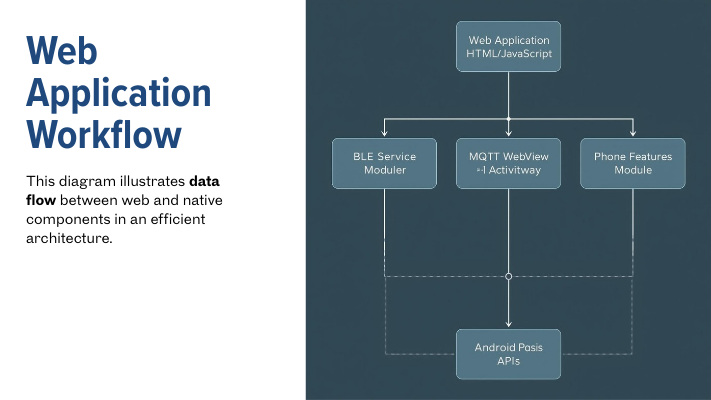
The WebView environment contains two independent runtimes:
- JavaScript Runtime (Web Layer)
-
Runs inside the WebView, executes HTML/JS/CSS, and handles UI and business logic.
-
Native Android Runtime (Java/Kotlin Layer)
- Runs inside the Android app, has access to device capabilities (camera, GPS, files, sensors, Bluetooth, etc.).
Because these runtimes cannot talk directly, we use a bridge, a structured communication system that passes messages between JavaScript and Android.
-
The JavaScript bridge is a combination of:
- A native object exposed to JS (e.g., window.NativeBridge) or a postMessage API.
- A message protocol (JSON messages with an action, id, params, etc.).
- Optional queuing, batching, and callback routing.
-
Native Android implements handlers for actions, performs device work, then replies back to JS.
Architecture Layers
1. JavaScript App Layer
This is the standard JS application running in the WebView: - UI interactions - Form handling - Page navigation - App logic
Calls to native APIs happen through a simplified interface, e.g.:
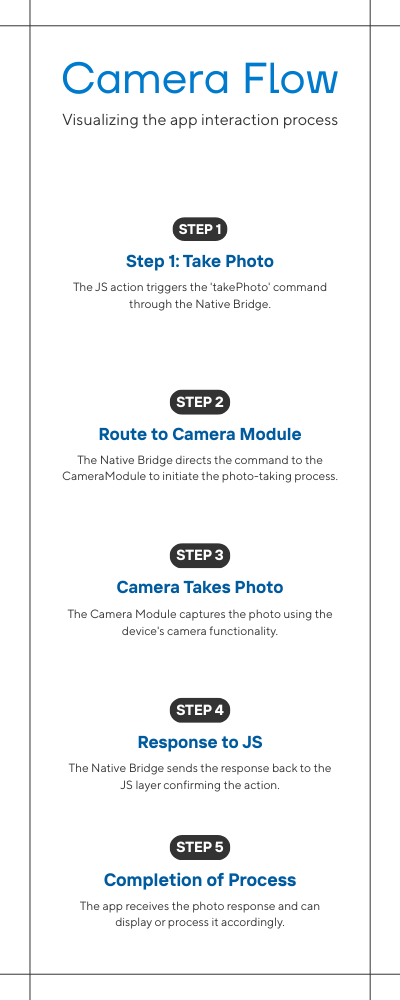
const photo = await Native.call("takePhoto");
2. JavaScript Bridge Layer (Client-Side)
This layer converts JavaScript function calls into structured messages, typically JSON. Its core responsibilities include: - Creating message packets - Assigning unique request IDs - Sending messages to the native layer - Handling asynchronous responses - Resolving or rejecting Promises in JS
Example JSON request:
{
  "id": "req-23",
  "action": "getLocation",
  "params": { "accuracy": "high" }
}
When native responds:
{
  "id": "req-23",
  "status": "ok",
  "result": { "lat": -1.288, "lng": 36.823 }
}
The JS bridge resolves the correct Promise based on id.
3. JavaScript ↔ Native Boundary
This is the actual “doorway” between both worlds.
JS → Native:
- Happens through addJavascriptInterface
- JS calls
Android.postMessage(jsonString)
Native → JS:
- Happens through evaluateJavascript()
- Native calls JS callback like:
window.onNativeMessage(jsonString)
Key characteristics:
- Communication is almost always asynchronous (because native operations take time and JS expects non-blocking behavior).
- Only strings can cross
- Requires JSON serialization
- Runs on different threads
4. Native Bridge Layer (Server-Side)
This layer receives JSON messages from the JS bridge and routes them to the appropriate native module.
Main responsibilities:
- Receive and parse incoming JSON messages
- Identify the requested action
- Execute the corresponding native function
- Convert results/errors into JSON
- Send a structured response back to JS:
Example workflow:
5. Native App Layer (Device Logic)
This is the actual Android implementation layer:
- Camera access
- File system operations
- Location services
- Bluetooth communication
- Permissions
- Storage
- Background tasks
The bridge places an abstraction layer above these features so JavaScript can request them without knowing how Android implements them.
Why This Architecture?
- Enables web applications to access native device features
- Allows UI to be built with web technologies
- Clean separation of concerns
- Safer than directly exposing multiple native methods
- Scalable, new native features added easily
- Works with any JS framework (React, Vue, Angular, plain JS)