Step 1 — Customer
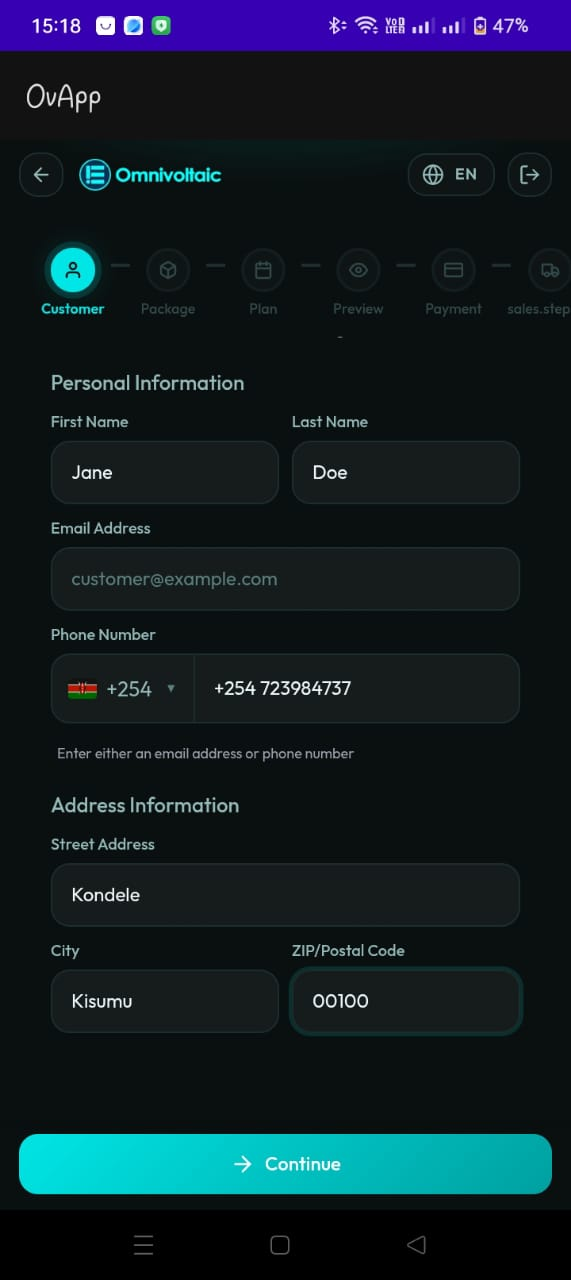
Purpose
Capture the new customer's personal details and register them in the backend (Odoo). This is the starting point of the onboarding flow.
Personal Information Fields
| Field | Required | Notes |
|---|---|---|
| First Name | Yes | |
| Last Name | Yes | |
| Phone Number | Yes | Includes a country selector (e.g. Kenya +254) |
| Email Address | Optional | At least one contact method (phone or email) must be provided |
Address Information Fields
| Field | Required | Notes |
|---|---|---|
| Street Address | Depends on business rules | |
| City | Depends on business rules | |
| ZIP/Postal Code | Depends on business rules |
Backend Registration
When the salesperson submits the customer details, the app registers the customer in Odoo. This creates a new customer record that will be linked to the package, subscription, and vehicle in subsequent steps.
Suggested Validations
- First Name and Last Name are required
- At least one contact method (phone or email) must be provided
- Phone number should be normalized based on the selected country code
- Duplicate customer detection (if supported by the backend)
Actions
- Continue proceeds to Step 2 — Package
- Back returns to the salesperson dashboard