Step 2 — Package
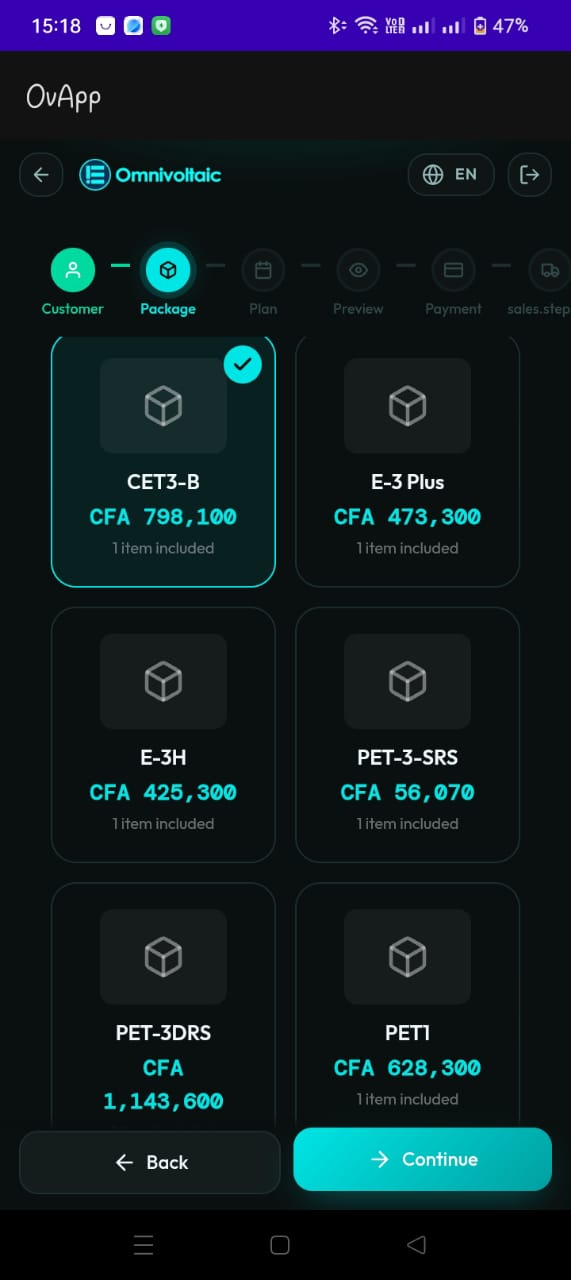
Purpose
Browse and select a product package for the customer. Each package bundles a main product (such as an electric motorcycle or home energy system) together with a battery swap privilege into a single priced offering.
What is a Package?
A package represents a complete product offering:
| Component | Description |
|---|---|
| Main product | The physical product (e.g. electric motorcycle, solar home system) |
| Battery swap privilege | Entitles the customer to battery swap services at stations |
| Price | The total cost of the bundled offering |
UI Behavior
Packages are displayed as cards in a grid:
- Package name (e.g. CET3-B, E-3 Plus)
- Price (shown in local currency)
- Items included (e.g. 1 item included)
- The selected card shows a checkmark in the top-right corner
Suggested Validations
- A package must be selected before the salesperson can continue
- The package list should load successfully; if empty, show an appropriate empty state
- Package availability should be confirmed with the backend
Actions
- Continue proceeds to Step 3 — Subscription
- Back returns to Step 1 — Customer