Step 5 — Payment
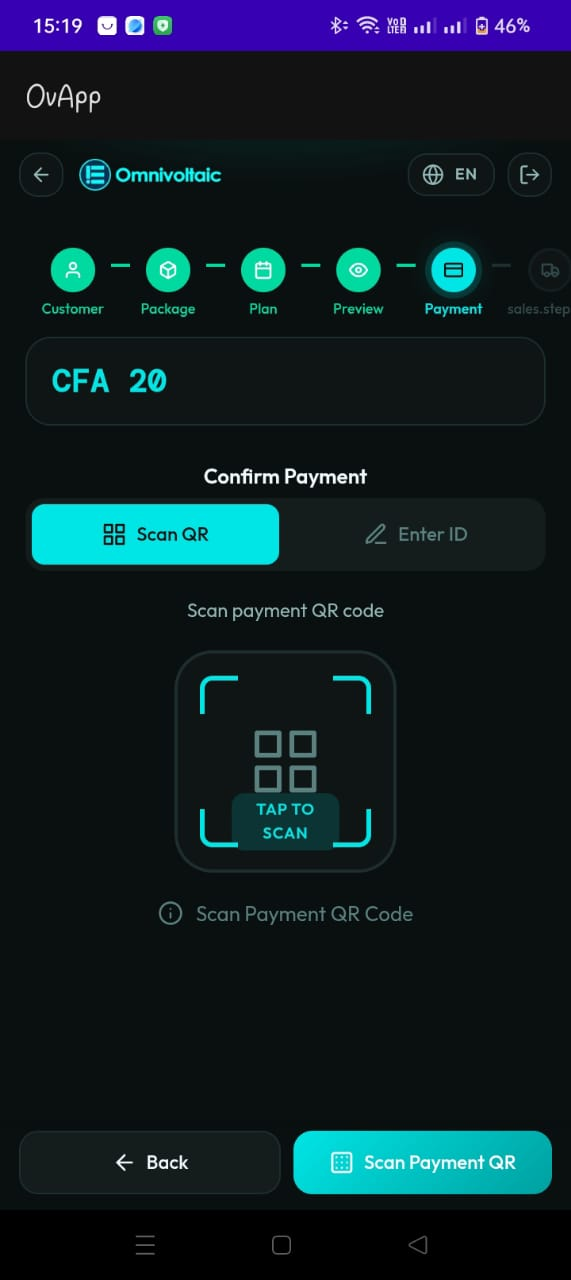
Purpose
Collect payment from the customer and create the subscription order in the backend. This step finalizes the financial transaction before the physical product is linked.
Payment Methods
QR Scan
- The salesperson scans the customer's M-Pesa payment QR code
- The scan area displays a clear call-to-action (e.g. Tap to Scan)
- Real-time feedback is provided during scanning
Manual Receipt Entry (Fallback)
- The salesperson manually enters the M-Pesa receipt/confirmation code
- Used when QR scanning is unavailable or the customer provides a receipt verbally
UI Elements
- Amount banner at the top displaying the total amount due
- Tab selector to switch between Scan QR and Enter ID
- Scan area with visual guidance for QR placement
- Receipt input field for manual entry
Backend Action
Once payment is confirmed, the app creates the subscription order in the backend. This links the customer, package, and subscription into an active order record.
Suggested Validations
- If QR scan returns an invalid or expired code, show an actionable error and allow retry
- If manual receipt is used, validate the format and confirm payment status before proceeding
- Ensure the confirmed payment is tied to the correct customer + package + subscription + total
- Payment confirmation must succeed before proceeding to the next step
Actions
- Confirm Payment proceeds to Step 6 — Vehicle
- Back returns to Step 4 — Preview