Step 4 — Preview
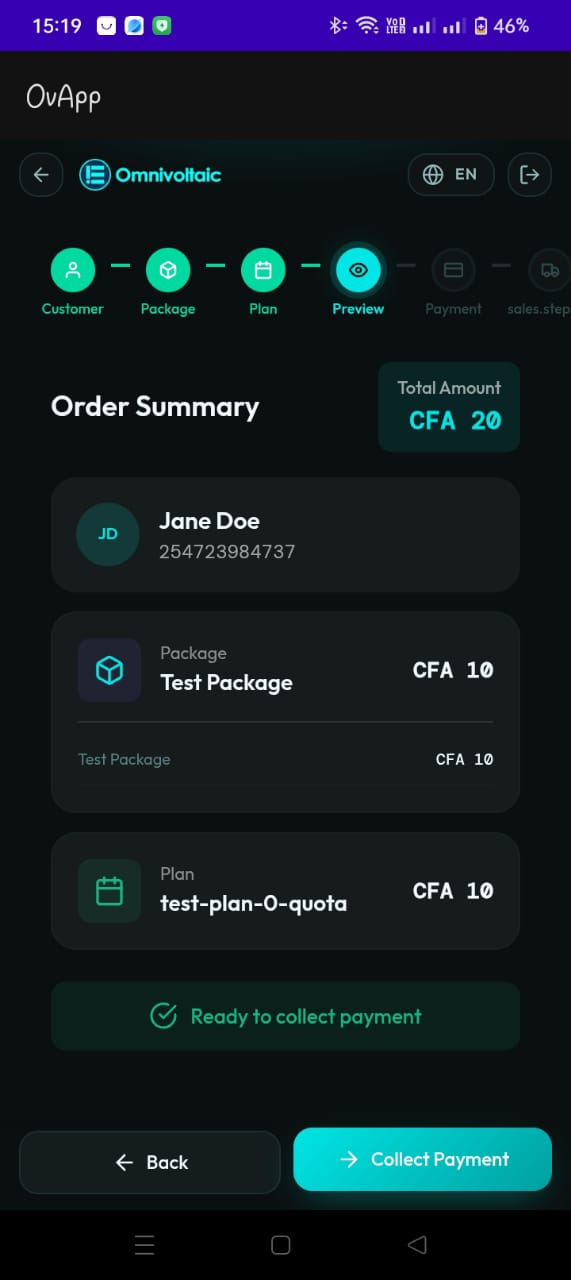
Purpose
Display a complete summary of everything selected so far so the salesperson can review before proceeding to payment.
What's Shown
The preview screen presents:
- Customer details
- Initials avatar (e.g. JD)
- Full name (e.g. Jane Doe)
- Contact information (phone, email)
- Package summary
- Package name
- Price
- Line item breakdown
- Subscription summary
- Plan name/code
- Price per payment cycle
- Total cost
- Displayed prominently (top-right summary card)
A status line indicates readiness (e.g. Ready to collect payment).
Suggested Validations
- Total should equal the correct combination of package price and subscription price (per business logic)
- Customer, package, and subscription details must match the selections from previous steps
- If any required step is incomplete, prevent moving forward and show a clear message
Actions
- Collect Payment proceeds to Step 5 — Payment
- Back returns to Step 3 — Subscription