Step 3 — Subscription
Purpose
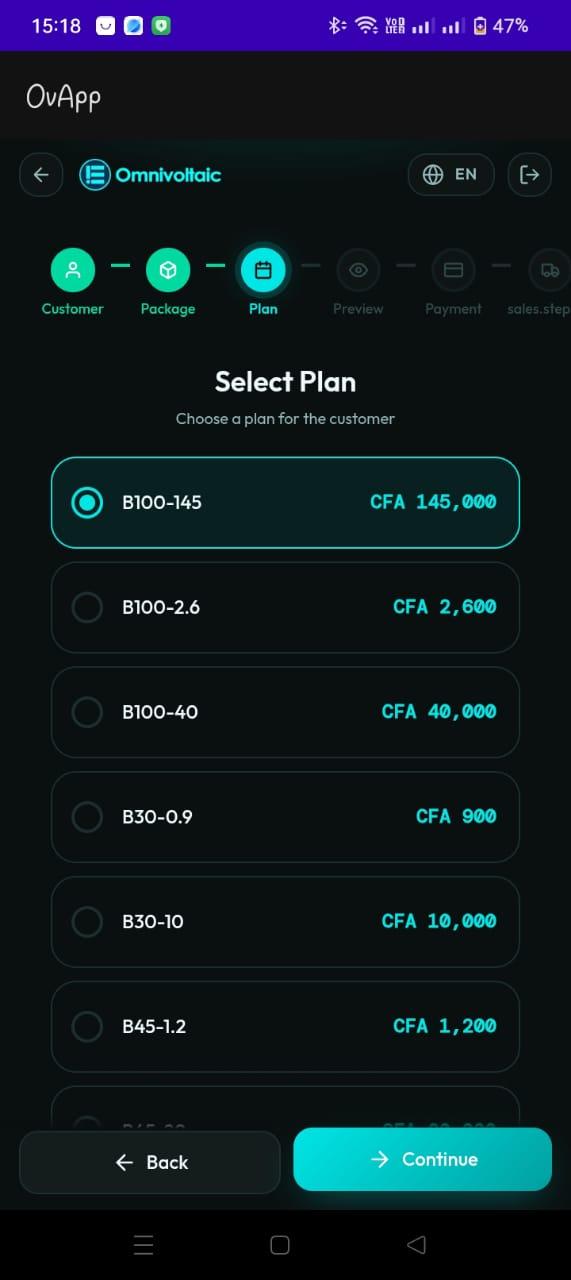
Choose a payment plan (subscription) for the customer. This defines how often they pay and at what price — weekly, monthly, or other intervals depending on the package.
What is a Subscription?
A subscription ties the customer to a recurring payment schedule for their selected package:
| Field | Description |
|---|---|
| Plan name/code | Identifier for the subscription tier (e.g. B100-145) |
| Frequency | How often the customer pays (weekly, monthly, etc.) |
| Price | The amount charged per payment cycle |
UI Behavior
Subscriptions are displayed as a list with radio selection:
- Plan code/name is shown for each option
- Price is displayed in local currency
- Only one subscription can be selected at a time
Suggested Validations
- A subscription must be selected before the salesperson can continue
- The subscription list should be filtered to only plans compatible with the selected package
- Pricing should be displayed consistently and correctly formatted
Actions
- Continue proceeds to Step 4 — Preview
- Back returns to Step 2 — Package