Products
The Products applet provides a browsable catalogue of products available for sale. It is a read-only reference tool — sales teams use it to look up product details, pricing, and categories before adding lines to a quotation in the Orders applet.
Access
| Login required | Yes — Sales Service Account (SA) |
| Applet slug | products |
Product List
The main screen shows all products in the Odoo catalogue for the active SA.
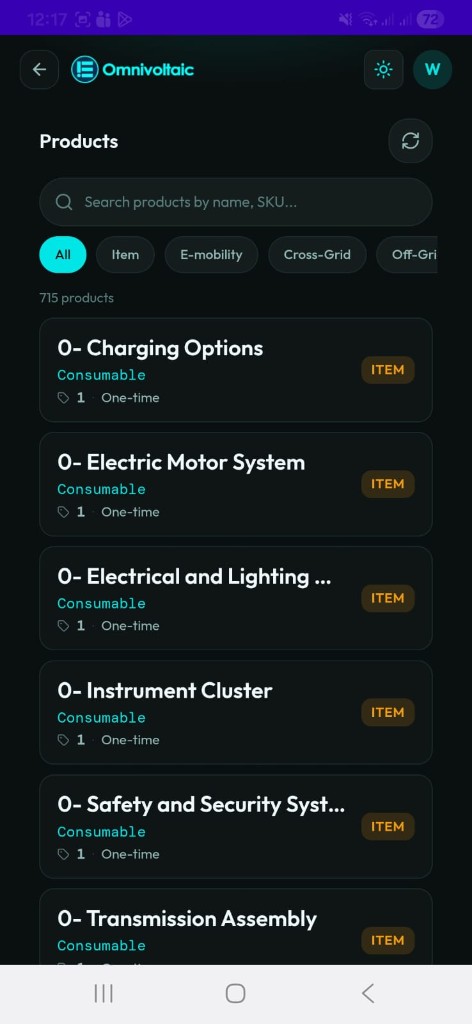
Searching & Filtering
| Control | Description |
|---|---|
| Search bar | Search by product name or SKU |
| All | Show all products regardless of category |
| Category chips | Filter by root-level product category (e.g. Item, E-mobility, Cross-Grid, Off-Grid) |
Results are paginated — 20 products per page. Use the previous / next controls at the bottom to navigate.
Product Cards
Each card displays the product name, type label (e.g. Consumable), list price, pricing type badge (One-time or Recurring), and category badge. Tap a card to open the product detail view.
Product Detail
The detail screen shows the full record for a selected product.
| Field | Description |
|---|---|
| Name | Product name |
| Status | Active or Inactive badge |
| SKU | Internal reference / stock-keeping unit |
| Type | Product type (e.g. Service, Consumable, Storable) |
| Price | List price |
| Category | Short name and full category path |
| Recurring | Whether the product is part of a subscription plan |
| Sale OK | Whether the product can be sold |
| Sales description | Customer-facing description shown on quotations |
| Internal notes | Internal reference notes (if set) |
Usage with Orders
Products from this catalogue are added as order lines when creating a new quotation in the Orders applet. Stock levels are checked in real time when adding a product — out-of-stock products cannot be added to a quotation.